EarthRanger Architecture
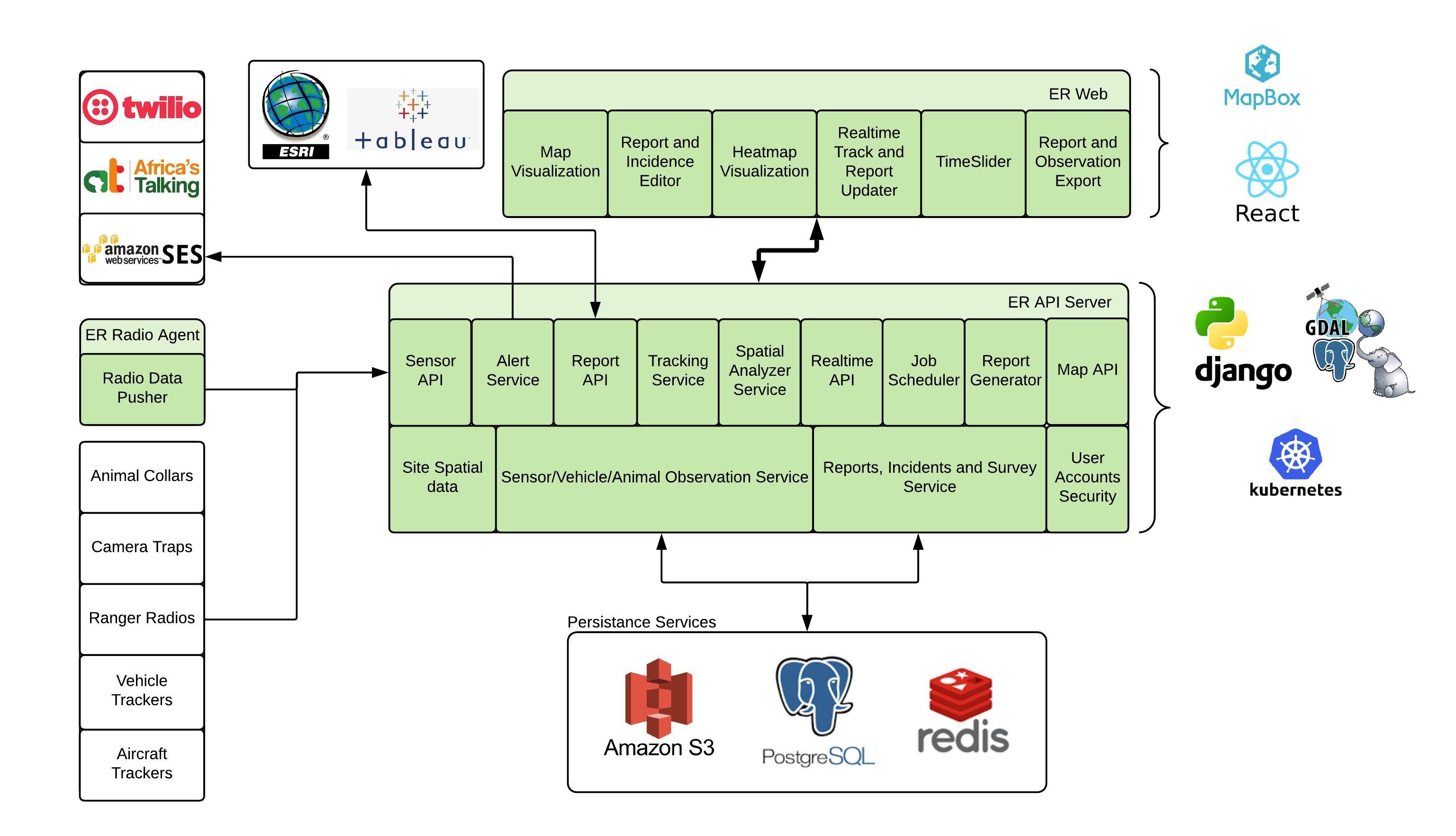
The EarthRanger software architect
Is described in python-developer-rules.mdc
Technology
The django web framework along with Django rest framework is our main tool. We use postgresql either in Google Cloud SQL or AlloyDB. PgCat provides load balancing to our Read Replicas. Redis is used for caching and celery job queues. Kombu for pubsub messaging.
Data Size
800 tenants and growing
2.5 billion sensor data points (observation)
32,000 users
Revisions
For some tables, we store all changes made by the user by using a matching revisions table for the originating table.
Activity - events and patrols
the Django Activity app contains our events and patrols implementation
Events
Events capture location, event time, who recorded the information, and structured data based on the event type. An Event Type is used to describe specific data to be collected using json schema to specify the data capture format. A schema is defined in the “json” field, additionally the UI layout is described in the “ui” field.
Events can be associated with subjects. Events can have attachments and notes. An event can be associated with a patrol
A collection is a way to group events of significance together. An Incident is a specific collection type.
EventType V1
EventType V2
Patrols
More generally, a patrol is an activity. This activity is lead by a patrol leader. It has a start time and place. During a patrol, Events can be collected.
Currently a Patrol has patrol segments, that are meant to be used to capture specific legs of a patrol. The people joining a patrol would be recorded in the patrol segment.
Observations
Observation table
this is the big table. Currently at 2.5 billion records, and growing 4 million rows a day. The table has been partitioned by month. We don’t currently have plans to archive any data as we promised a user can review in real-time all of their subject data using our timeslider. And yes, loading a map with 5 years of data would crowd the map. Attributes include
Source_id
recorded_at
location - geometry field lat/lon
created_at
updated_at
additional - json field to store device specific observation data like temp or battery level
Important Schema Note: The Observation table does NOT have a direct subject_id field. The relationship to subjects is inferred through the following indirect path:
Observation.source → SubjectSource.source_id
SubjectSource.subject_id (via the assigned_range datetime overlap)
The SubjectSource.assigned_range field determines which subject an observation belongs to during a specific time period
SourceProvider
A Source has an associated SourceProvder Attributes include
Display name
lag notification threshold, show we create an event when we haven’t seen data for their sources
additional: json attributes, letting us store unstructured data per provider
Source
every Observation record has an associated source. Think of the source as a device, collar, tracker, weather station, etc. Attributes include
Manufacturer_id
Model Name
Source Provider
additional: json attributes, letting us store unstructured data per provider
Subject
This is the animal, vehicle, person carrying the source. Attributes include
Subject Type - Wildlife, Vehicle, Person, Stationary Subject
Subject subtype - Wildlife: elephant, giraffe, etc. Vehicle: car, truck, etc. Person: Ranger, manager, dog_team
additional: json attributes, letting us store unstructured data per provider. example: sex, color of track
Active - is animal active, shown on map, returned in most api calls
SubjectSource
A Subject carries a Source for a fixed time. The assignment is kept in the SubjectSource table, which as a date range “assigned_range” which is when the subject had the source. We use this daterange as a filter on the observations table so we only get those source and assigned_range observations when we build the track for a Subject
Attributes include
Source_id
Subject_id
location - for camera traps that are stationary, we record their location here over looking at observations
assigned_range - time range field, represents when the source was assigned to the subject
additional - extra json data for this record
SubjectStatus
The SubjectStatus record for a Subject holds the latest movement and status of the radio that subject is assigned. This table is basically a cache for the last known location of the Subject. Supports delay permissions by creating several of these records for a single subject.
Attributes include
subject_id
location - last known location of the subject
recorded_at - time of last known location
additional - extra attributes, json
radio_state - status of the radio at this time
delay_hours - to support caching, we can set the delay_hours to 24, and remember where the subject was located 24 hours ago
SubjectGroup
A hierarchical grouping of Subjects. A Subject can exist in more than one group. Groups can be nested as sub groups. A PermissionSet is assigned to a SubjectGroup to give users permission to subject(s).
SourceGroup
A hierarchical grouping of Sources. Similar to subjects, a source can be in more than one group. Groups can be nested as sub groups. A PermissionSet is assigned to a SourceGroup to give users permission to a source(s)
Real-time Updates
When a new Observation is added to the database, the following process occurs:
Identify the Source of the new Observation
Find the Subject that has this Source assigned during the Observation’s
recorded_attime by checking theSubjectSource.assigned_rangeVerify that the identified SubjectSource is the active record for the Subject during that time period
Confirm this Observation is the most recent one by:
Searching the Observation table for this Source within the assigned_range. We want the most recent in the assigned_range for this Source
If the Observation’s Source is currently assigned to the subject, we can optimize this search by getting the Observation from the LatestObservationSource table.
Update the Subject’s SubjectStatus record with the new Observation data
Daily Maintenance
A nightly job runs to ensure SubjectStatus records remain accurate. For each Subject:
Iterate through the Subject’s assigned SubjectSource records, ordered by descending
assigned_rangeFind the most recent non-excluded Observation for each Source
Update the SubjectStatus record with the most recent valid Observation
Typically found within the current SubjectSource assigned_range
May require checking previous assigned_range windows if no recent Observation exists